Adding Twitter Feeds to Your Blogger Account

0

Labels:

This should not be nearly as hard as it turns out to be. But I tried using the Feed widget supported by blogger, but I never could get it to update in a reasonable amount of time. The new widgets offered by blogger are cool, but they are often suited better for iGoogle rather than a blogger acount. I found the following video, which helped me get on the right track.


RSS reader look here to see video

After that, I found the http://twitter.com/badges/blogger page which walks you through the whole process. Hope this helps you!

how to transfer a blog from one account to another (on blogger)

0

Labels:

Through the process of learning a great deal this week about hosting blog sites, I found that I would have to move a blog over to a new user. How do you do this? Check out the instructions below

This works, it's safe, and it's simple. You always have at least one administrator. You can't short this procedure. You will, of course, have to have both accounts active for some time. Don't start this if you've lost the account name, or forgotten the password, on one of the accounts. Plan this process with some care.

Note that you may perform some or all of these steps. Some steps may be performed by another person while you observe, or distant from you, at your discretion.
If the new owner isn't already a blog member

Login to the blog, using an account that currently has administrative access. From Settings - Permissions, add a new blog member, using a suitable email address used by the person being given access.

Login to Google, under the email account targeted in step 1. Open the email received, and accept membership, using any valid Google account. Or setup a new Google account, if necessary. Note that the email account used initially, and the Google account may, or may not, be the same.

Login to the blog, using an account that currently has administrative access. From Settings - Permissions, make the new member an administrator. Be careful, and only add administrators who can perform reliably.

If you're transferring ownership, not adding an administrator
Login to the blog, using the account that was just given administrative access. From Settings - Permissions, remove the old account. Using the account that was just added, to remove the old account, assures you that the account just added now has administrative authority.>>

(Note 1): If you're doing this in preparation to switching your Blogger, GMail, or other email account, do not discontinue the current account until you have executed, and tested, step 2.Remember, though, that you can only login to one Google account at a time, from a single computer. If you have other abilities setup on the current Google account, you'll be constantly logging off and onto each account, as you switch back and forth.>>

(Note 2): Remember that Google authenticates using one account, for multiple tasks (Blogger, Google Apps, Google Mail, and others), using cookies. Be sure to clear cache and cookies (both cache and cookies, and the two are not the same), at the end of the procedure above. If you use one computer for all steps, you'll be logging off one account and onto another; in that case, you will want to clear cache and cookies after each step. Take it slowly and carefully.

How to use Google SMS (written via txt msg)

0

Labels: ,

You should try out something called Google SMS. It is an awesome tool. Test it by txting 'weather 29651' to 466453 (Google) Or try 'Yankees' I love it. What do you think? :-)

Going to a Blog format for the church website

2

Labels:

I am sorry I have been away from the blog for a few days. I have been doing some research in the website development department. We are considering a blog format for our entire church website. Is this a good/bad idea? Do you personally know of any sites that are doing this? Link me up!

How do I import blog posts into FaceBook?

6

Labels: ,

My good friend Jeremy asked me this question: "I'm trying to figure out how to get my notes or blogs imported onto facebook. How do you do it?"


I had to look around a little to get directions that make more sense than what mine would be. I got this info from AskOwen


Importing your blog posts into FaceBook is really easy .. once you know how. Here’s how to do it:
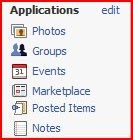
First of all you’ll need to log into FaceBook. Do this in the normal way, then have a look at the screen youare presented with. If you look on the left hand side of your screen you’ll see a menu list of different Applications you have associated with your account. This starts off as a simple list, but as you add more Applications the list will grow longer. Your application list can be quite long, but one of the options in the menu is called Notes and this is the one you’re after. Click on this to proceed to the next step.


Your Notes page will show you a number of different notes that your contacts might have added to their profile (or nothing if you don’t have many friends). This will include both Notes typed on FaceBook and also posts from their blogs if they are using this technique. Don’t worry about what’s on this page for now, just look on the right hand side of the page and you’ll see a section called Notes Settings. Look for a link that says Import a blog and click this to proceed to the next step. You will then be presented with the following form:


Enter the URL to your blog in the text box. It doesn’t need to be your RSS feed, as FaceBook will figure this out on it’s own. You’ll have to tick the disclaimer underneath the URL and then just click Start Importing.


You’re done! I told you it wasn’t hard!